Product Update
Introducing Chat Summarization: Cut Your Token Costs by 95%
Long conversations are expensive. Every time you send a chat completion request with full history, you're paying for tokens you've already paid for — over and over again. Today we're launching Chat Summarization, a feature that intelligently compresses your conversation history while preserving context, slashing your token costs dramatically.
Marius Ndini
Founder · Jan 4, 2026
The Hidden Cost of Conversation History
Your chatbot or agent have been having a productive conversation with a user. They're 50 messages in, discussing a complex topic. Every new message requires sending the entire conversation history to the LLM for context.
The math:
The Token Tax Problem
You're paying for the same 7,500 tokens every single message. In a 100-message conversation, you've paid for those early messages 50+ times.
With GPT-4o at $2.50 per million input tokens, a single power user having 10 long conversations per day can cost you $15-25/month — just in repeated context tokens. Scale that to 1,000 active users and you're looking at $15,000-25,000/month in avoidable costs.
How Chat Summarization Works
Mnexium's Chat Summarization uses a rolling summarization approach. Instead of sending your entire conversation history, we intelligently compress older messages into a concise summary while keeping recent messages verbatim.
user: Hi, I need help setting up my project...
assistant: Of course! Let me help you with that...
user: I'm using React with TypeScript...
assistant: Great choice! Here's how to configure...
... 46 more messages ...
user: Now I need to add authentication
assistant: For authentication, I recommend...
[Conversation Summary - Messages 0-35]
User is setting up a React + TypeScript project. Key decisions made:
- Using Vite as build tool with strict TypeScript config
- Chose TailwindCSS for styling, configured with custom theme
- Set up ESLint + Prettier with recommended rules
- Implemented component library structure in /src/components
- Added React Query for server state management
user: The components are working great. Now I need routing.
assistant: For routing in React, I recommend React Router v6...
user: Perfect, that's set up. What about state management?
assistant: Since you're using React Query for server state...
user: Now I need to add authentication
The AI still has full context of what was discussed — project setup, decisions made, preferences expressed — but compressed into a fraction of the tokens. Recent messages are kept verbatim to maintain conversational flow.
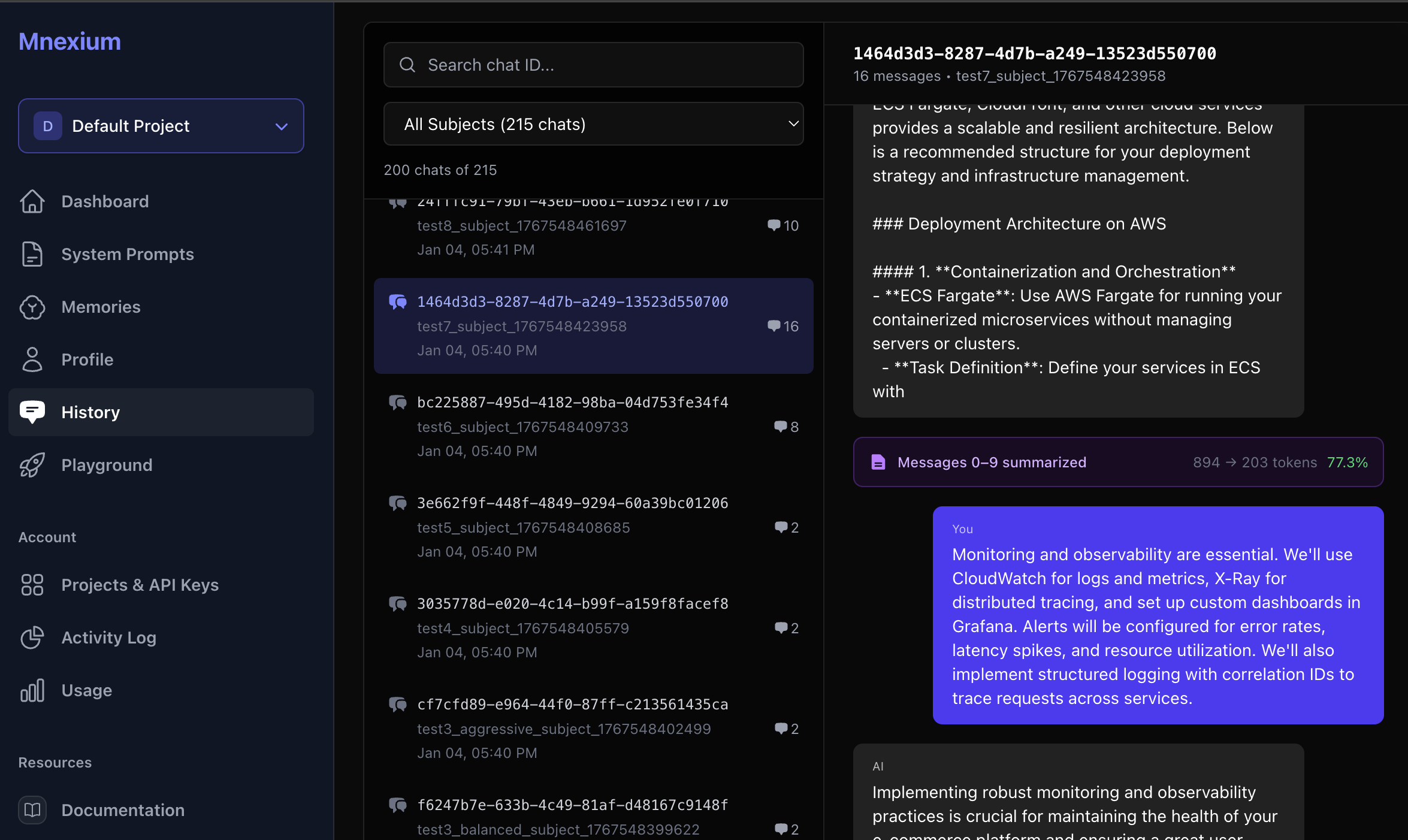
Summarization Modes
Different applications have different needs. A customer support bot might need more context than a casual chatbot. We provide three pre-configured modes plus full customization:
Light Mode
~50% compressionStarts summarizing at 70K tokens. Keeps 25 recent messages verbatim. Best for applications where detailed context is critical.
Balanced Mode
~75% compressionThe sweet spot for most applications. Starts at 55K tokens, keeps 15 recent messages. Great balance of context preservation and cost savings.
Aggressive Mode
~95% compressionMaximum cost savings. Starts at 35K tokens, keeps only 8 recent messages. Ideal for high-volume, cost-sensitive applications where recent context is most important.
Custom Mode
You decideFull control over every parameter. Define your own thresholds based on your specific use case, model context limits, and cost targets.
mnx: {
  summarize_config: {
    start_at_tokens: 40000,
    chunk_size: 20000,
    keep_recent_messages: 12,
    summary_target: 900
  }
}Non-Blocking Background Summarization
Summarization happens asynchronously in the background. When we detect that history exceeds the threshold, we trigger a summarization job but don't block the current request. The user gets their response immediately, and the summary is ready for the next request.
Request Flow:
- 1Request arrives with 60K token history
- 2Check for existing summary → found, covers messages 0-200
- 3Use summary + uncovered messages + recent messages
- 4Generate updated summary
- 5Return response immediately (no blocking)
This architecture means zero added latency for your users. The first request after threshold might use full history, but subsequent requests benefit from the cached summary.
Full History Always Preserved
Summarization is purely an optimization — your complete conversation history is always saved. Every message, every response, every detail remains accessible in full fidelity. The summary is only used when injecting context into new LLM requests.
- Complete audit trail: Every message is stored verbatim for compliance and debugging
- History API unchanged: Fetch full conversation history anytime via the History API
- Dashboard access: View and search complete conversations in the Mnexium dashboard
- No data loss: Disable summarization anytime and your full history is still there
Think of summarization as a read-time optimization, not a write-time compression. Your data stays complete — we just send a smarter, smaller payload to the LLM.
The Cost Savings Math
Let's look at real numbers for a typical SaaS application:
Scenario: Customer Support Bot
Daily active users
1,000
Avg conversations/user/day
3
Avg messages/conversation
40
Avg tokens/message
200
Without Summarization
Tokens per conversation (cumulative):
~164,000 tokens
Daily token usage:
492M tokens
Monthly cost (GPT-4o @ $2.50/M):
$36,900/month
With Aggressive Summarization
Tokens per conversation (with summary):
~12,000 tokens
Daily token usage:
36M tokens
Monthly cost (GPT-4o @ $2.50/M):
$2,700/month
Monthly Savings
$34,200
Reduction
92.7%
Real-World Use Cases
Enterprise Support Bots
Support conversations can span hours or days as complex issues are debugged. A single ticket might generate 100+ messages. Without summarization, each response costs more than the last. With summarization, costs stay flat regardless of conversation length.
AI Coding Assistants
Developers working on complex features might have conversations spanning entire codebases. Code snippets are token-heavy. Summarization captures the key decisions ("using React Query for state", "chose PostgreSQL over MongoDB") without repeating every code block.
Educational Tutoring
Students learning a subject have long, iterative conversations. The AI needs to remember what concepts were covered, what the student struggled with, and what examples were used. Summarization preserves this pedagogical context efficiently.
Sales & Lead Qualification
Sales conversations often span multiple sessions over days or weeks. The AI needs to remember company size, pain points, budget discussions, and stakeholder concerns. Summarization captures these key details without the cost of full history replay.
How to Enable Summarization
Enabling summarization is a single parameter in your API request:
const response = await fetch("https://mnexium.com/api/v1/chat/completions", {
  method: "POST",
  headers: {
    "Authorization": "Bearer mnx_live_...",
    "x-openai-key": "sk-...",
    "Content-Type": "application/json"
  },
  body: JSON.stringify({
    model: "gpt-4o",
    messages: [{ role: "user", content: "Continue our discussion..." }],
    mnx: {
      subject_id: "user_123",
      chat_id: "chat_456",
      history: true,
      summarize: "balanced"  // "light" | "balanced" | "aggressive" | false
    }
  })
});
Custom Configuration
Need fine-grained control? Pass a custom configuration object:
mnx: {
  subject_id: "user_123",
  chat_id: "chat_456",
  history: true,
  summarize_config: {
    start_at_tokens: 40000,      // When to start summarizing
    chunk_size: 20000,           // Tokens to summarize at a time
    keep_recent_messages: 12,    // Always keep N recent messages
    summary_target: 900          // Target summary length in tokens
  }
}
What Gets Preserved in Summaries
Our summarization prompt is tuned to preserve the information that matters most for continued conversations:
- Key decisions made. "User chose PostgreSQL over MongoDB for better relational queries" — the AI remembers why, not just what.
- Important facts mentioned. Names, dates, numbers, technical specifications — anything that might be referenced later.
- Action items and tasks. "User needs to implement authentication next" — so the AI can follow up appropriately.
- User preferences expressed. Communication style, technical level, areas of expertise — for personalized responses.
- Technical details for reference. API endpoints discussed, code patterns established, architecture decisions — the context needed for coherent assistance.
Summarization + Memory: The Complete Picture
Chat Summarization works beautifully alongside Mnexium's memory system. Here's how they complement each other:
Summarization
Compresses within a single conversation. Preserves flow and context for the current chat session. Optimizes token costs for long conversations.
Memory (learn/recall)
Extracts facts across all conversations. Enables cross-session personalization. Builds long-term user understanding.
Use both together: summarize: "balanced" keeps your current conversation efficient, while learn: true andrecall: true ensure important facts persist across sessions.
Getting Started
Chat Summarization is available now for all Mnexium users. To get started:
- 1Add the parameter: Include
summarize: "balanced"in your mnx object. - 2Monitor in Activity Log: Watch for
chat.summarizeevents to see compression ratios. - 3Tune as needed: Start with "balanced", adjust to "light" or "aggressive" based on your quality/cost tradeoff.
- 4Track savings: Compare your token usage before and after — you'll see the difference immediately.
Ready to cut your token costs?
Chat Summarization is available now on all plans. Check out the documentation for detailed configuration options, or try it in the playground to see it in action.
We're excited to help you build more cost-efficient AI applications. As always, we'd love to hear your feedback on how summarization is working for your use case.
Happy building! 🚀