Product Update
Introducing Profiles: Structured User Data for AI Applications
Today we're launching Profiles — a new way to manage structured, schema-defined user data alongside your free-form memories. Profiles give your AI applications instant access to key user attributes like names, emails, timezones, and custom fields — all automatically extracted from conversations or set via API.
Marius Ndini
Founder · Jan 3, 2026
The Problem: Memories vs. Structured Data
Mnexium's memory system is incredibly powerful for storing free-form facts about users: "User prefers dark mode", "User is learning Rust", "User has a dog named Max". But what about structured data that every application needs?
Things like a user's name, email, timezone, or preferred language don't fit neatly into the free-form memory model. You need to query them by key, update them reliably, and ensure only one value exists at a time.
Why Businesses Need Structured User Data
In today's AI-first landscape, businesses are racing to deliver hyper-personalized experiences. But personalization at scale requires more than just remembering random facts — it requires structured, queryable, reliable user data. Here's why:
🔄 System Integration & Data Sync
Modern businesses run on interconnected systems — CRMs, support platforms, marketing automation, billing systems. When your AI learns a user's email or company name, that data needs to flow seamlessly to Salesforce, HubSpot, Zendesk, or your internal tools. Free-form memories like "User's email is john@example.com" can't be reliably parsed and synced. Structured profile fields with defined keys can.
⚡ Real-Time Personalization at Scale
When you have millions of users, you can't run semantic search every time you need to know someone's timezone. Profile fields are indexed by key, enabling instant lookups. Your AI can greet users by name, schedule meetings in their timezone, and respond in their preferred language — all without the latency of vector search.
🎯 Compliance & Data Governance
GDPR, CCPA, and other privacy regulations require businesses to know exactly what personal data they hold and where it lives. With structured profiles, you have a clear schema: "We store name, email, timezone, and language for each user." Auditors and compliance teams can understand and verify this. A blob of free-form memories? Much harder to audit and govern.
📊 Analytics & Segmentation
Product teams need to segment users by attributes: "Show me all users in the Pacific timezone" or "How many enterprise customers prefer Spanish?" These queries are trivial with structured profile fields. With free-form memories, you'd need complex NLP pipelines just to answer basic business questions.
🔐 Single Source of Truth
What happens when your AI extracts "User is in New York" from one conversation and "User mentioned they're on Pacific Time" from another? With free-form memories, you might have conflicting information floating around. Profile fields enforce a single value per key — when the timezone changes, the old value is superseded, not duplicated. One user, one timezone, always.
🤝 Human-in-the-Loop Corrections
AI extraction isn't perfect. When a support agent or the user themselves needs to correct a value, they need a clear interface: "Change timezone from America/New_York to America/Los_Angeles." Structured fields make this trivial. Correcting free-form text memories requires finding the right memory, editing it, and hoping no other memories contradict it.
The bottom line: free-form memories are perfect for capturing the richness of human conversation — preferences, stories, context. But structured profiles are essential for the operational data that powers business processes, integrations, and compliance.
That's where Profiles come in.
What Are Profiles?
Profiles are business-defined schemas that capture the structured information your organization needs about each user. Think of it as your company's custom data model for user attributes — tailored to your specific industry, use case, and integration requirements.
Unlike free-form memories that capture the richness of conversation ("User mentioned they love hiking on weekends"), profiles capture the operational data your business runs on: the fields your CRM expects, the attributes your support team needs, the segments your marketing relies on.
Your Schema, Your Rules
Every business is different. A B2B SaaS company needs company_name,job_title, andteam_size. A healthcare app needspreferred_pharmacy andinsurance_provider. An e-commerce platform needsshipping_preference andsize.
With Mnexium Profiles, you define exactly what fields matter to your business. The AI then knows what to look for in conversations and extracts those specific attributes automatically.
B2B SaaS
- • company_name
- • job_title
- • team_size
- • industry
- • use_case
Healthcare
- • date_of_birth
- • insurance_provider
- • preferred_pharmacy
- • primary_physician
- • allergies
E-Commerce
- • shipping_address
- • size_preference
- • favorite_brands
- • gift_recipient
- • loyalty_tier
How Profiles Work
- Schema-Driven Extraction. Define your schema once, and the LLM knows exactly what to extract. When a user mentions "I work at Acme Corp as a product manager", Mnexium automatically populates
company_nameandjob_title— because those fields are in your schema. - Automatic Updates. When information changes, the new value supersedes the old one. "Actually, I just switched to the Enterprise plan" automatically updates
subscription_tier. No duplicate data, no conflicts — just the current truth. - Confidence & Provenance. Every field tracks where it came from (conversation, manual edit, API sync) and how confident the extraction was. Your team can trust AI-extracted data while maintaining full visibility into its source.
- Human Override. AI extraction isn't perfect. Support agents and users can correct values at any time, and manual edits always take priority over AI extractions. The system learns from corrections to improve future accuracy.
How It Works
1. Automatic Extraction from Conversations
The simplest way to populate profiles is to let Mnexium do it automatically. When you make a chat completion request with learn: true, the LLM analyzes the conversation and extracts both free-form memories AND structured profile fields.
User: Hi! I'm Sarah Chen. I just moved to New York from San Francisco.
Assistant: Welcome to New York, Sarah! How are you settling in?
From this single exchange, Mnexium automatically extracts:
- ✓Profile: name = "Sarah Chen" (confidence: 0.95)
- ✓Profile: timezone = "America/New_York" (confidence: 0.85)
- ✓Memory: "User recently moved from San Francisco to New York"
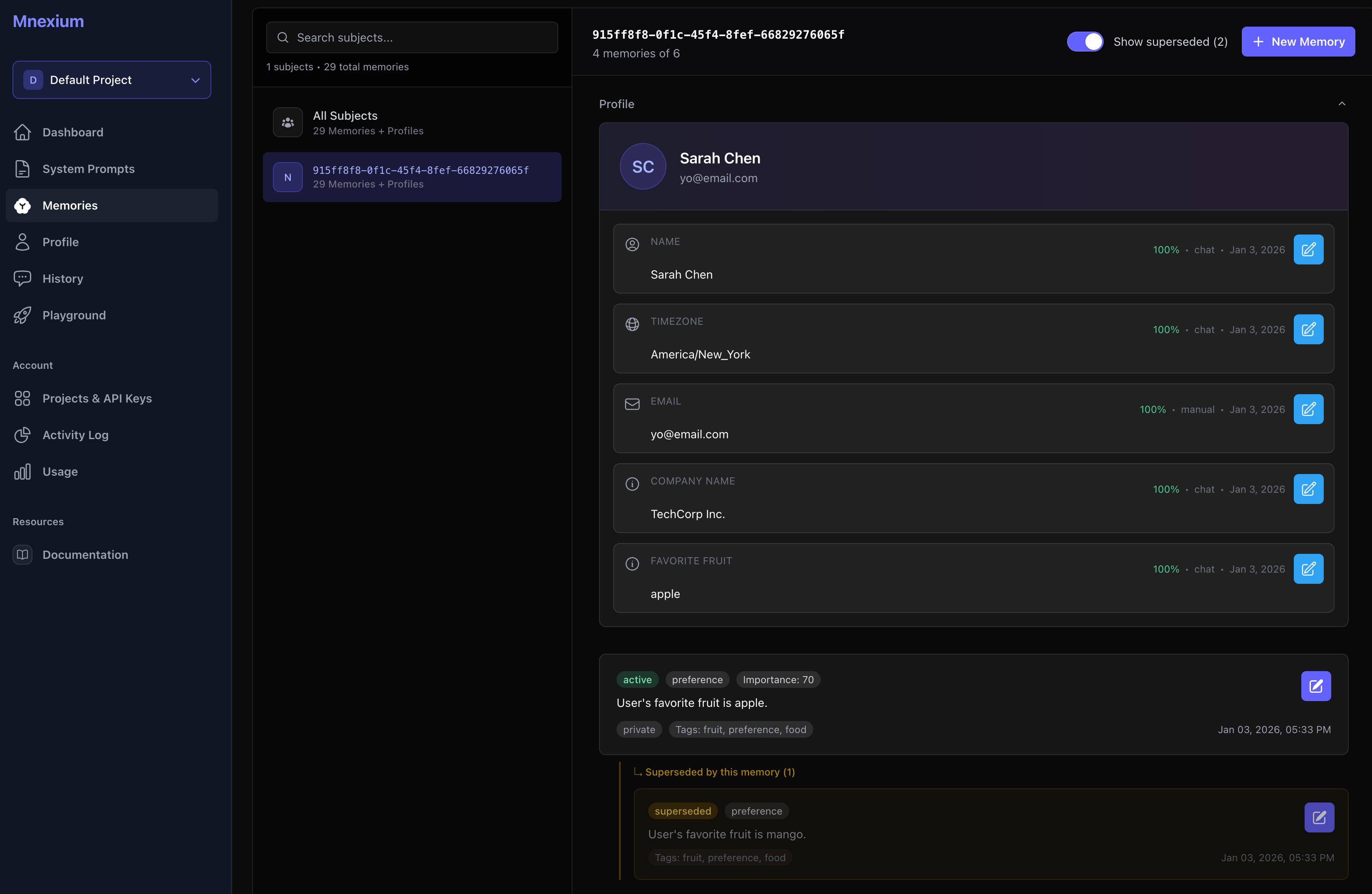
The Memories view shows all extracted facts and preferences, with superseded memories grouped under their replacements.
2. Direct API Access
You can also read and write profile fields directly via our new Profiles API. This is perfect for:
- • Pre-populating profiles from your existing user database
- • Building profile editing UIs in your application
- • Syncing profile data with external systems
- • Correcting or overriding extracted values
curl -G "https://www.mnexium.com/api/v1/profiles" \
  -H "Authorization: Bearer $MNX_KEY" \
  --data-urlencode "subject_id=user_123" \
  --data-urlencode "format=full"
{
  "data": {
    "name": {
      "value": "Sarah Chen",
      "confidence": 0.95,
      "source_type": "chat",
      "updated_at": "2026-01-03T10:30:00Z"
    },
    "timezone": {
      "value": "America/New_York",
      "confidence": 0.85,
      "source_type": "chat",
      "updated_at": "2026-01-03T10:30:00Z"
    }
  }
}
3. Smart Superseding
One of the most powerful features of Profiles is automatic superseding. When a user's information changes, Mnexium intelligently handles the update:
Example: Sarah originally said she's in New York. Later she mentions "I'm actually on Pacific Time now — I moved back to SF."
Mnexium will:
- Extract the new timezone: "America/Los_Angeles"
- Mark the old "America/New_York" value as
superseded - Only return the new value in future profile queries
- Preserve the old value for audit purposes
The superseding logic considers:
- Confidence scores: Higher confidence values supersede lower ones
- Source type: Manual edits (confidence: 1.0) always win
- Recency: Newer extractions supersede older ones at the same confidence
Default Profile Schema
Every project comes with a default set of system fields that cover the most common use cases:
nameUser's full name
emailEmail address
timezoneIANA timezone (e.g., "America/New_York")
languagePreferred language
You can also define custom fields specific to your application through the Profile Schema editor in the dashboard. Add fields like company,role,subscription_tier, or anything else your AI needs to know about users.
Profiles in the Dashboard
The Profile Schema builder lets you define exactly what fields your AI should extract and track. Configure your schema once, and Mnexium handles the rest:
- • AI Extraction Mode: Choose between auto-fill from conversations, explicit API-only updates, or manual-only edits
- • Custom Profile Fields: Add fields specific to your business — company name, favorite fruit, whatever you need
- • Default System Fields: Name, Timezone, Email, and Language come pre-configured
- • Field Types: Mark fields as required or optional based on your data needs
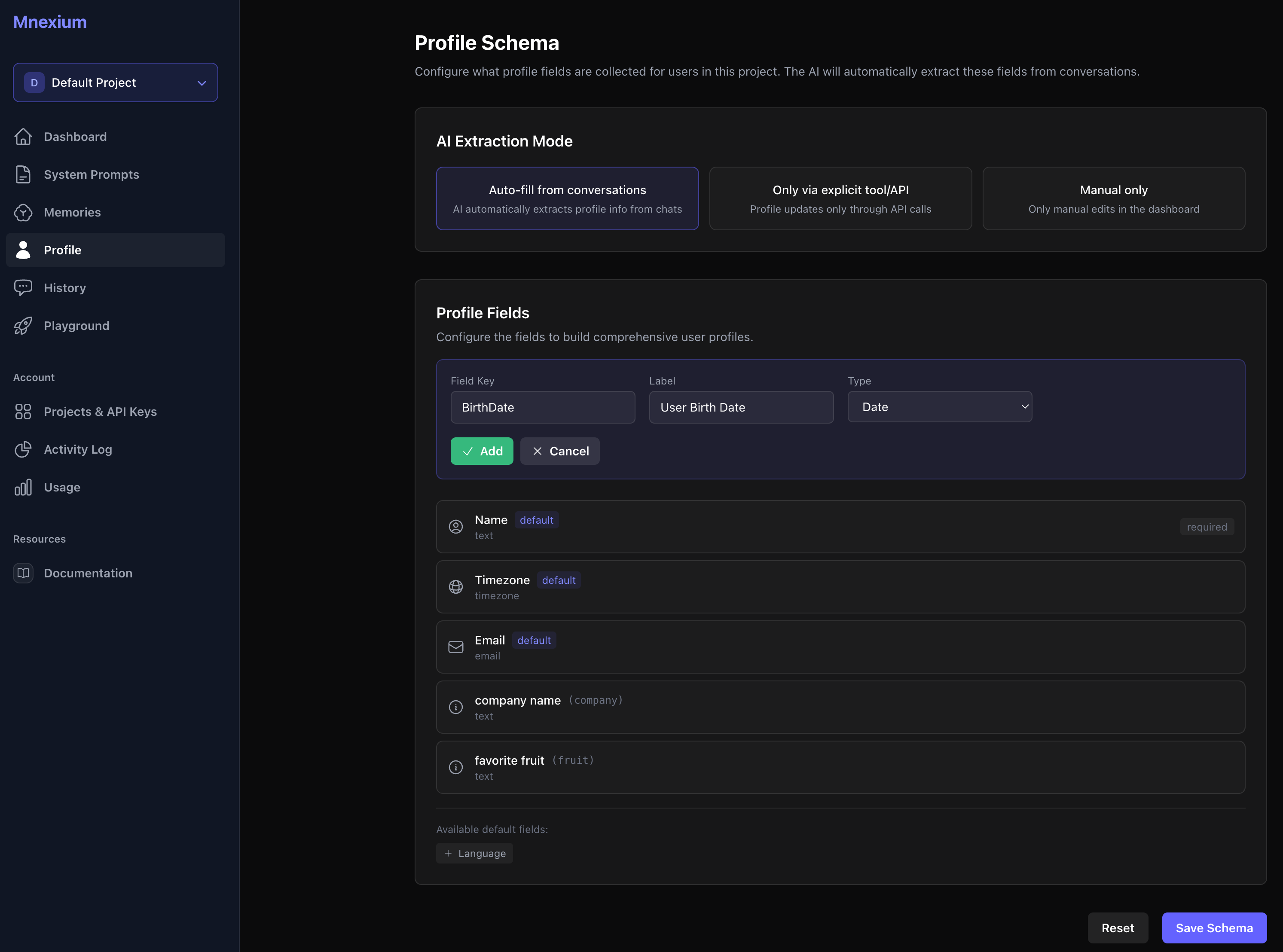
The Profile Schema builder lets you configure extraction modes and define custom fields for your business.
API Reference
The Profiles API includes three endpoints:
/api/v1/profilesRetrieve a subject's profile. Use format=full for detailed metadata including confidence, source, and timestamps.
/api/v1/profilesUpdate profile fields. Supports batch updates with optional confidence scores. Updates withconfidence: 1.0 are treated as manual edits.
/api/v1/profilesDelete a specific profile field. The underlying memory is soft-deleted and can be restored if needed.
For complete documentation with request/response examples, see the Profiles API documentation.
Use Cases
Profiles unlock powerful personalization capabilities:
🌍 Timezone-Aware Responses
"Good morning, Sarah!" at 9am their time, not yours. Schedule meetings, set reminders, and format dates correctly based on the user's extracted timezone.
👤 Personalized Greetings
Address users by name from the first message of a new conversation. No need to ask "What's your name?" every time — Mnexium remembers.
🔄 CRM Sync
Use the Profiles API to sync user data between Mnexium and your CRM, support system, or user database. Keep everything in sync automatically.
📊 User Segmentation
Define custom profile fields like subscription_tier orcompany_size to tailor AI responses based on user segments.
Getting Started
Profiles are available now for all Mnexium users. Here's how to get started:
- 1Enable learning: Add
learn: trueto your chat completion requests. Profile fields will be extracted automatically. - 2View profiles: Open the Memories dashboard and select a subject to see their profile card.
- 3Customize schema: Visit the Profile page in your dashboard to add custom fields specific to your application.
- 4Use the API: Integrate the Profiles API to read, update, and sync profile data programmatically.
Ready to try Profiles?
Profiles are available now on all plans. Check out the documentation or jump into the API Explorer to test the new endpoints.
We're excited to see what you build with Profiles. As always, we'd love to hear your feedback —
Happy building! 🚀